React Bootstrap is Dying: 10 Modern Alternatives for Your Next Project

What's Inside
Why Developers are Abandoning React Bootstrap
React Bootstrap was built in an era of "The Total Framework." It brought its own styles, its own grid system, and its own layout engine. While this was great for consistency, it created two major problems for modern applications:
- Bundle Bloat: Including the entire Bootstrap CSS file adds significant weight to your LCP scores.
- Styling Conflicts: Overriding Bootstrap's default styles (like their specific button colors or border-radius) often requires using
!importantor deep selector nesting, leading to fragile CSS.
Today, developers prefer modularity. They don't want a "Total Framework." They want internal building blocks like accessible React buttons and responsive React navbars that they can drop into any layout without worrying about global CSS interference.
The Top 10 React Bootstrap Alternatives (2026)
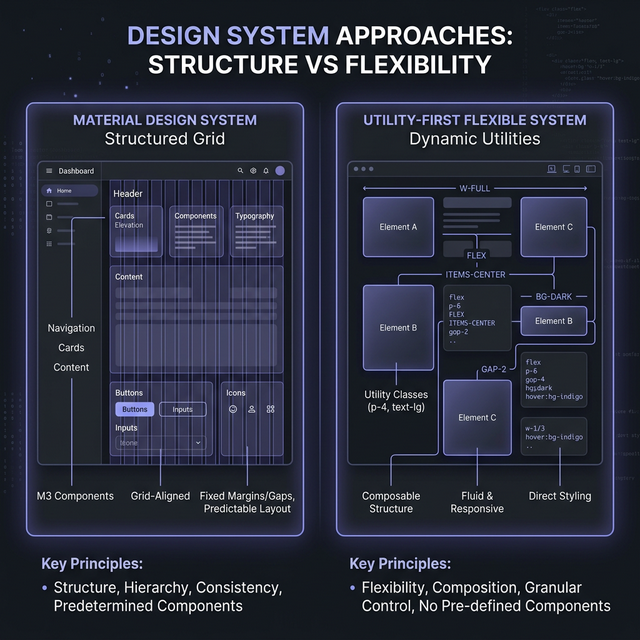
Beyond Bootstrap: Exploring MUI, Chakra, and utility-first alternatives.
1. IndoUI (Modern Copy-Paste UI)
IndoUI represents the newest generation of UI development. Instead of importing an npm package that contains thousands of lines of unused code, you copy exactly what you need. Our modern React cards and React data tables are built with Tailwind CSS, ensuring that your final CSS bundle remains as small as possible.
2. Tailwind UI
If you want the "official" Tailwind experience, Tailwind UI offers professionally designed HTML and React snippets. It focuses on the "Utility-First" approach, which is the direct opposite of Bootstrap's "Component-First" approach.
3. Mantine
For those who still want a "batteries-included" library but with a modern performance profile, Mantine is the best choice. It offers deep customization via a powerful theme object, avoiding the styling battles common in Bootstrap.
4. Shadcn UI
Exactly like IndoUI, Shadcn UI prioritizes ownership of code. It uses Radix primitives to handle the accessibility (which is much better than Bootstrap's a11y implementation) while letting you handle the visuals via Tailwind.
The Tailwind Advantage: Performance and Freedom
The biggest shift in web design has been toward Functional CSS. In 2026, the ability to build complex, responsive React form sections without writing a single line of custom CSS is invaluable. Tailwind scans your files and generates only the CSS you actually use. This means your site loads faster, scores higher on Core Web Vitals, and provides a better user experience.

Step-by-Step Migration Strategy
Don't try to migrate your entire app in one go. Instead, follow this "Strangler Pattern" for UI migration:
- Phase 1: Dual Stack: Install Tailwind alongside Bootstrap. Start building all *new* components with Tailwind.
- Phase 2: The Wrapper Strategy: Create local components (e.g.,
MyButton.tsx). Initially, it returns a Bootstrap Button. Gradually change its implementation to a Tailwind/IndoUI Button. - Phase 3: The Purge: Once all instances of a Bootstrap component are gone, remove that component's import. Finally, once all components are gone, remove the Bootstrap CSS link.
Frequently Asked Questions
Is Tailwind CSS harder to learn than Bootstrap?
Tailwind has a slightly steeper initial learning curve because it requires you to understand CSS properties better. However, once learned, it is much faster to develop with because you don't have to look up framework-specific class names like 'mt-3' vs 'margin-top-3'.
Can I use Bootstrap's grid with React components from other libraries?
Technically yes, but it's not recommended. Modern CSS Grid and Flexbox (utility-accessible in Tailwind) are far more powerful and flexible than Bootstrap's 12-column floated grid.
Explore Related React Components
Upgrade Your UI with IndoUI
Leave the legacy frameworks behind. Switch to high-performance, responsive React components that give you absolute control over your design.
See the Modern Way